

Omnigent Releases
September 2026
v0.14.0
Released 2026-09-15 · 3 min read · Omnigent maintainers
This release makes it easier to work across GitHub repositories, configure sessions, and keep track of ongoing work. It also adds deployment options and improves session recovery.
Work across repositories
- Track multiple GitHub PRs in one session, including PRs from different repositories.
- Switch between PR summaries and diffs, and manually link or unlink PRs.
- Start a managed sandbox with multiple GitHub repositories: choose repositories and branches when creating a session; Omnigent clones them in parallel so the agent can work across them.
A smoother chat interface
- Configure sessions in one place. The redesigned composer brings workspace, agent, model, reasoning effort, and permission controls together, with improved folder browsing.
- Find sessions faster. Search session names with
⌘⌥Son macOS orCtrl+Alt+Son Windows/Linux. - Open the model picker from your keyboard with
⌘⇧Mon macOS orCtrl+Shift+Mon Windows/Linux. - Inspect running background commands from a compact badge beside the composer's workspace controls.
- Manage context in Claude SDK sessions. See context-window usage and run
/compactto summarize the conversation and free space, including with Claude Pro/Max logins.
Expanded sandbox and database support
- Gensee: provision and clean up managed sandboxes.
- Kubernetes: run sandboxes on dedicated node pools using tolerations.
- CockroachDB: use it as Omnigent's application database.
Reliability fixes
- Pending approvals and requests for user input remain answerable across server and runner restarts.
- Native Codex sessions resume more reliably, preserving permission overrides and selected reasoning effort.
- Working indicators more accurately reflect agent activity, and completed answers remain visible when background work resumes.
- Improved interruption behavior and fixes for archived sessions reappearing.
- More consistent validation of agent settings and preservation of reviewed tool arguments.
What's Next
Install or upgrade Omnigent:
uv tool install --python 3.12 omnigent # or: pip install "omnigent"v0.13.0
Released 2026-09-09 · 3 min read · Omnigent maintainers
Omnigent 0.13.0 is a major release focused on tightening the loop between your agents, your code, and the infrastructure they run on — from watching a branch's pull request come together live inside the workspace to running every session in its own self-reclaiming sandbox. A new GitHub panel puts the PR, its checks, and a full diff right beside the agent, Canvas graduates into a built-in per-project board of live session cards, and a wave of managed-sandbox providers, faster session switching, and new harnesses round out the release.
1. GitHub PR panel in the session workspace
A new GitHub panel in the session workspace rail shows the branch's pull request without leaving Omnigent — the summary, comments, CI checks, and a stacked diff with a file-tree navigator, all refreshing live as the agent pushes. You watch the PR take shape in the same window where the work is happening.
To use it, start a New Chat from a repository with an open pull request, then open the panel and switch between the split Summary and Changes tabs to move from the overview to the file-by-file diff. In managed sandboxes with GitHub Connect configured, private clones and in-session git and gh authenticate as your connected account, so pushes and PR actions run as you.
2. Canvas as a built-in page
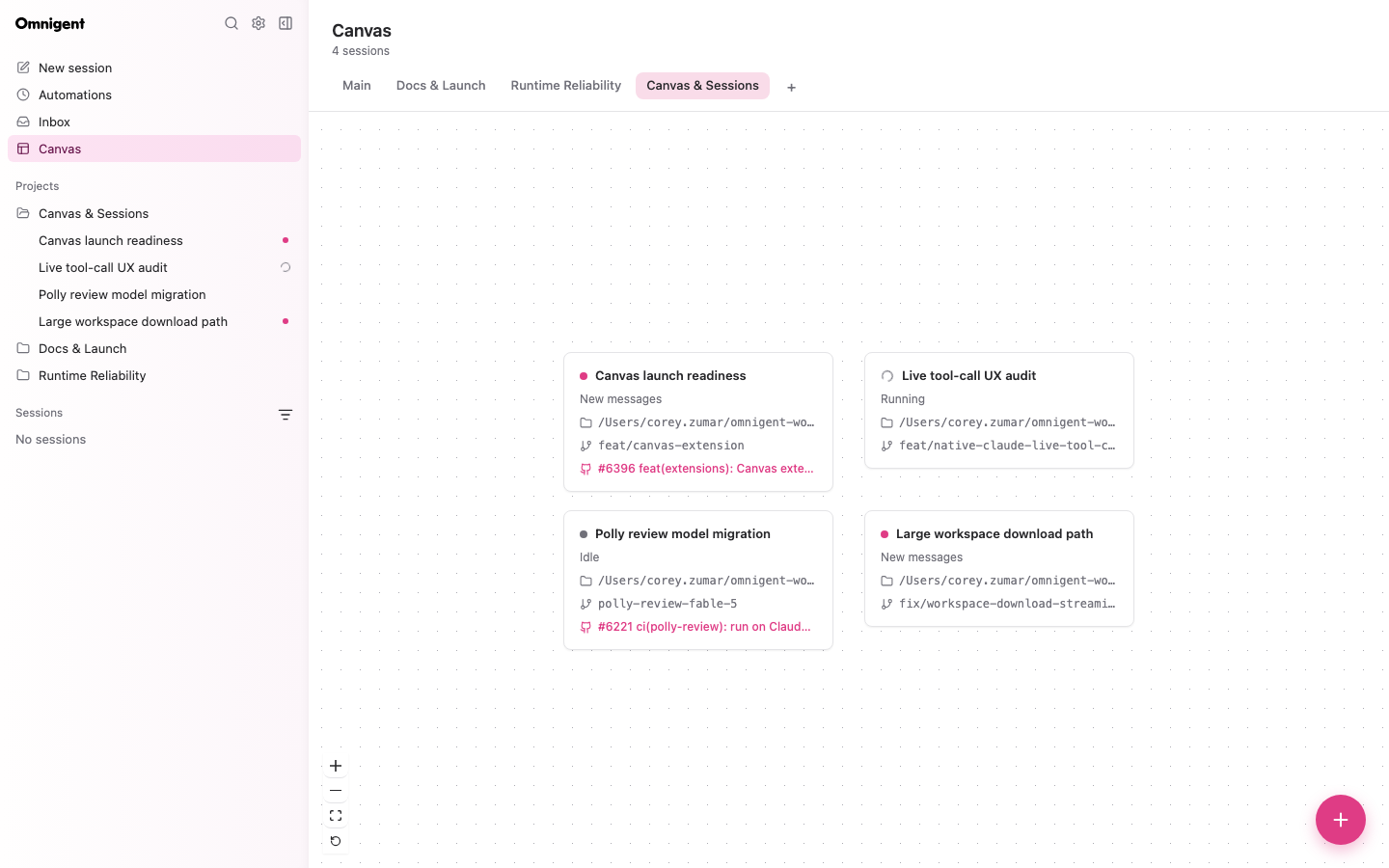
Canvas is now a built-in page rather than a separate extension: a per-project board of draggable session cards, each showing live status, its worktree branch, and a link to its PR. It gives you a spatial, at-a-glance view of everything in flight on a project.
From the board you can open a session's transcript or start a brand-new session in place, so Canvas becomes the launch point for your work rather than just a status display. Enable the built-in page with OMNIGENT_FEATURES=canvas.
3. New managed-sandbox providers
Omnigent gains two new ways to run managed sandboxes. You can run each host in a local libkrun microVM by setting sandbox.provider: microsandbox, which gives you sub-second boots and in-place resume, or run hosts as self-reclaiming Kubernetes agent-sandbox resources that stay alive while an agent is working, suspend when idle, and resume later with their workspace intact.
Both paths are built to avoid waste: sandboxes that remain offline can be reaped automatically, so idle compute doesn't linger.
Learn more in the Cloud Sandbox Host.
4. Instant session switching
Sessions now feel instant. New conversations open immediately while the server catches up in the background, and long transcripts virtualize so switching between them stays fast even when history is deep.
The sidebar keeps up too: rows label themselves with your first prompt and highlight the moment you click them, and new sessions can be auto-named for you — a behavior you can toggle in Settings.
Learn more in the Session management.
5. More harnesses and enterprise CLIs
Omnigent adds more ways to bring your preferred agents along. Jcode joins as a first-class ACP harness, and the EXTRA_HARNESS_CLIS build-arg bakes extra harness CLIs — goose, jcode, cursor, kimi, and more — into the host image, so you can extend the image without forking the Dockerfile.
Enterprises get two more building blocks: an opt-in OAuth 2.0 client-credentials grant, and a HashiCorp Vault Transit backend for the credential store.
Learn more in the Harnesses supported via ACP.
Before upgrading
- Managed terminals now require tmux 3.3 or newer. Upgrade tmux before launching a managed terminal.
- The standalone
omnigent-canvasextension has been removed. Enable the built-in Canvas page withOMNIGENT_FEATURES=canvasinstead. omnigent updateis deprecated. Useomnigent upgrade(oromni upgrade) instead.
Full Changelog: https://github.com/omnigent-ai/omnigent/blob/main/CHANGELOG.md
What's Next
Upgrade an existing Omnigent installation:
omni upgradeOr install Omnigent for the first time:
uv tool install --python 3.12 omnigent # or: pip install "omnigent"v0.12.0
Released 2026-09-01 · 3 min read · Omnigent maintainers
Omnigent 0.12.0 is a major release focused on meeting your existing tools and workflows where they already live, from pulling your current CLI conversations into the web UI to running your host as an always-on background service. Projects now shape every new session with their own agent, workspace, and git defaults; the mobile and wide-screen UI gets a top-to-bottom refresh; and a wave of new harnesses and model controls give you finer say over which model runs and how hard it thinks.
1. Import your existing local CLI sessions
If you already have a trail of conversations in Claude Code, Codex, or another CLI, you no longer have to leave them behind. From the web UI you can pull your recent CLI conversations straight into Omnigent, and each one keeps its original title so you can find it again.
This means the work you've already done comes with you — pick up an earlier session in Omnigent instead of starting from scratch.
Learn more in the Import existing chats.
2. Projects that drive new sessions
Projects now shape the sessions you start inside them. Name a project_id when you create a session and it inherits that project's agent, workspace, and git defaults, so a new session starts already pointed at the right code and configuration.
You can also move an existing session into a project straight from the folder tag in its title. And when a session is started from a project, it now uses the project's configured agent and directory instead of silently swapping to something else.
Learn more in the Projects.
3. Refreshed mobile and wide-screen UI
The interface has been reworked to feel right on every screen size. On mobile you get a ChatGPT-style drawer and full-screen search; on ultra-wide displays, Omnigent now makes better use of all that horizontal space.
You also get more control over how it looks and behaves: export and import your appearance settings, switch to a heavier code font, jump around long messages with a markdown table of contents, and choose whether Enter or ⌘-Enter sends your message.
Learn more in the Appearance settings.
4. More harnesses and finer model control
Omnigent 0.12.0 broadens what you can run and how you run it. Antigravity arrives with the omni agy shortcut and agy-native aliases, while Devin and Grok Build now show up in the New Chat picker. Setup also offers a "Pi — use own login" option.
On the model side, the pi harness takes a reasoning-effort setting that you can even change mid-session with /effort, self-hosted models like Ollama and vLLM support custom per-token pricing, and when you fork a session you can give the fork its own model, effort level, and approval mode.
Learn more in the Models & Credentials.
5. Run your host as a service
Your host can now run as a proper background service. Use omni host enable and omni host disable to install a per-user service on macOS or Linux, so your host is there whenever you need it. Running omnigent host or omnigent start opens the web UI for you automatically.
ACP sub-agents such as Devin now appear as their own child sessions, with their tool calls shown right in the transcript, so you can see exactly what each one is doing.
Full Changelog: https://github.com/omnigent-ai/omnigent/blob/main/CHANGELOG.md
What's Next
Install or upgrade Omnigent:
uv tool install --python 3.12 omnigent # or: pip install "omnigent"August 2026
v0.10.0
Released 2026-08-19 · 3 min read · Omnigent maintainers
Omnigent v0.10.0 is a major release focused on scaling out where and how your agents run, from spreading sandboxes across multiple providers to switching conversations instantly. This release adds first-class multi-provider sandboxing with a new Blaxel backend and self-restarting Kubernetes runners, promotes Devin to a built-in harness alongside easier Copilot and ACP-agent setup, introduces a Usage page for tracking cost and spend, and makes session management — moving, forking, and bulk-cleaning sessions — something you can drive entirely from the web UI.
1. Multiple sandbox providers, Blaxel, and self-healing Kubernetes runners
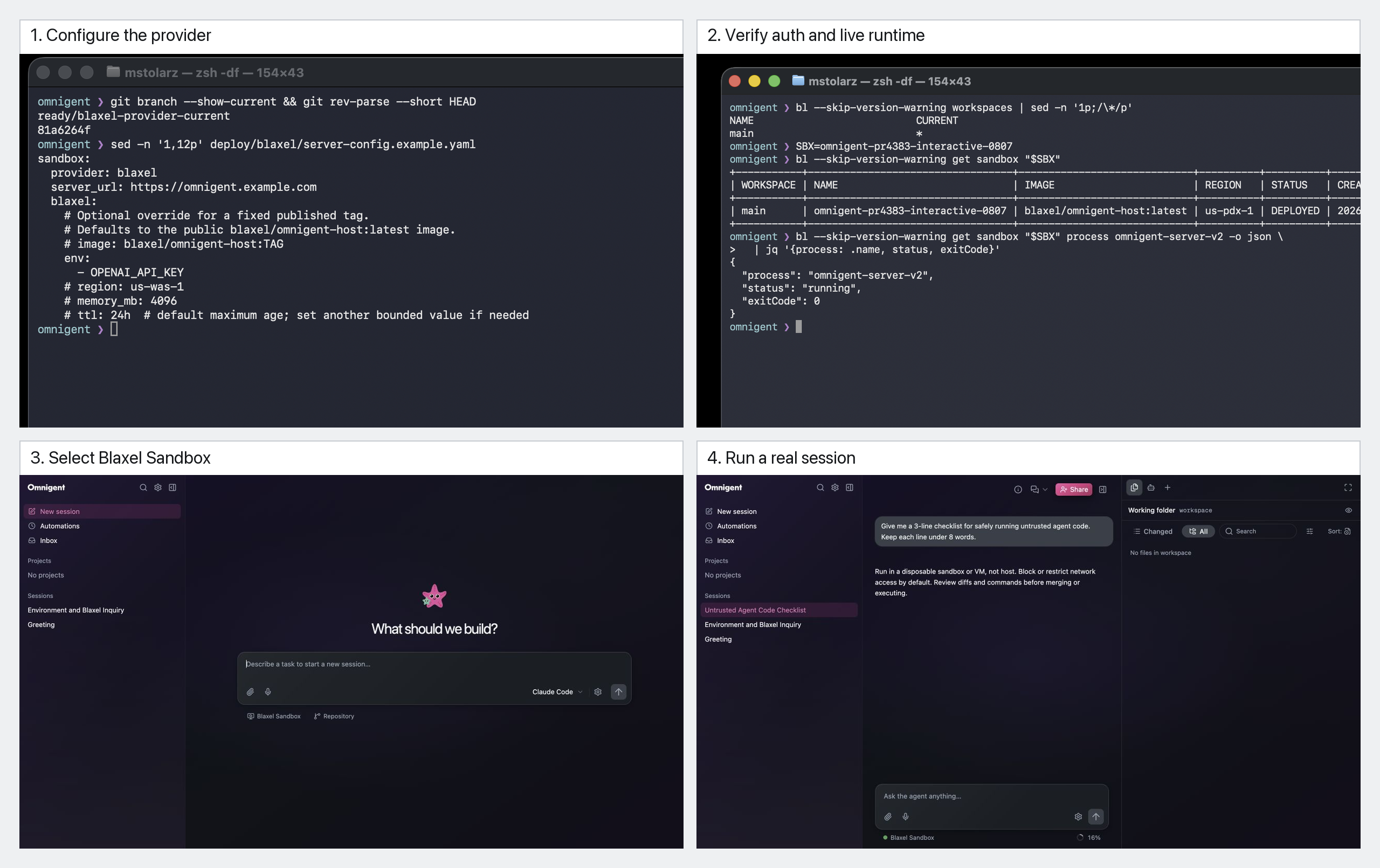
You can now run several sandbox providers side by side. The new sandbox.providers configuration lets you register more than one backend and expose a picker option for each, so different sessions can land on different infrastructure without reconfiguring the server. This release also adds a new Blaxel provider to the mix.
On Kubernetes, runners now launch as Jobs, which means a crashed runner restarts automatically instead of leaving the session stranded. To get a cluster up quickly, there's an ArgoCD quick-start overlay you can deploy from.
Learn more in the Cloud Sandbox Host.
2. Devin as a built-in harness, plus easier ACP and Copilot setup
Devin is now a built-in harness, so you can pick it directly rather than wiring it up by hand. Configured ACP agents — Devin, Grok Build, and others — show up automatically in omni setup and in the New Chat picker, making them selectable the moment they're configured.
The Copilot harness now authenticates using your existing gh auth login session, including GitHub Enterprise hosts, so there's no separate credential dance to get it working.
Learn more in the Configuration.
3. Usage page for cost and spend tracking
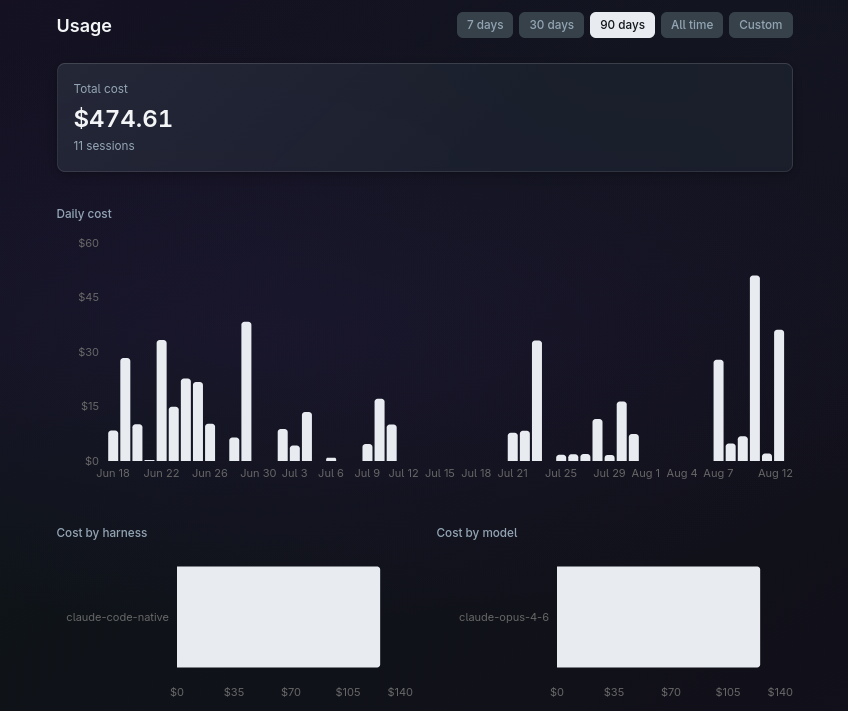
A new Usage page gives you visibility into what your sessions cost. It tracks session costs and daily spend, and breaks spending down by harness and by model, so you can see where your budget is going at a glance.
For deployments, you can gate features — including the Usage page itself and web-driven harness setup — behind the OMNIGENT_FEATURES setting, letting you control which capabilities are exposed to your users.
4. Manage sessions from the web UI
Session management is now a full web-UI workflow. You can move a running session to another machine, fork a sub-agent up into its own top-level session, and leave a session someone has shared with you — all without dropping to the terminal.
When it's time to clean up, you can bulk-move or bulk-delete sessions, with optional worktree-branch cleanup so leftover branches don't pile up behind you.
Learn more in the Session management.
5. Instant conversation and terminal switching
Switching between conversations and terminals is now instant. Background conversation streams stay open instead of tearing down and reconnecting, so jumping back into a session is immediate.
Web terminals now attach over loopback when the runner is local, which cuts keystroke echo from around 250 ms down to under 10 ms — typing in a local session feels native again.
Full Changelog: https://github.com/omnigent-ai/omnigent/blob/main/CHANGELOG.md
What's Next
Install or upgrade Omnigent:
uv tool install --python 3.12 omnigent # or: pip install "omnigent"v0.9.0
Released 2026-08-11 · 3 min read · Omnigent maintainers
Omnigent 0.9.0 is a major release focused on putting the right model behind every task and polishing the surface you work on all day, from automatic model-and-harness selection to a refreshed web UI. It brings smart routing that sends each task and its subagents to the best model and harness, a redesigned interface built around a Zinc palette and clearer session controls, deeper control over sandboxes and deployments, a first-class Grok Build harness alongside a set of ship-ready example agents, and new Nimble web builtins for pulling structured data straight off the web.
1. Smart Routing
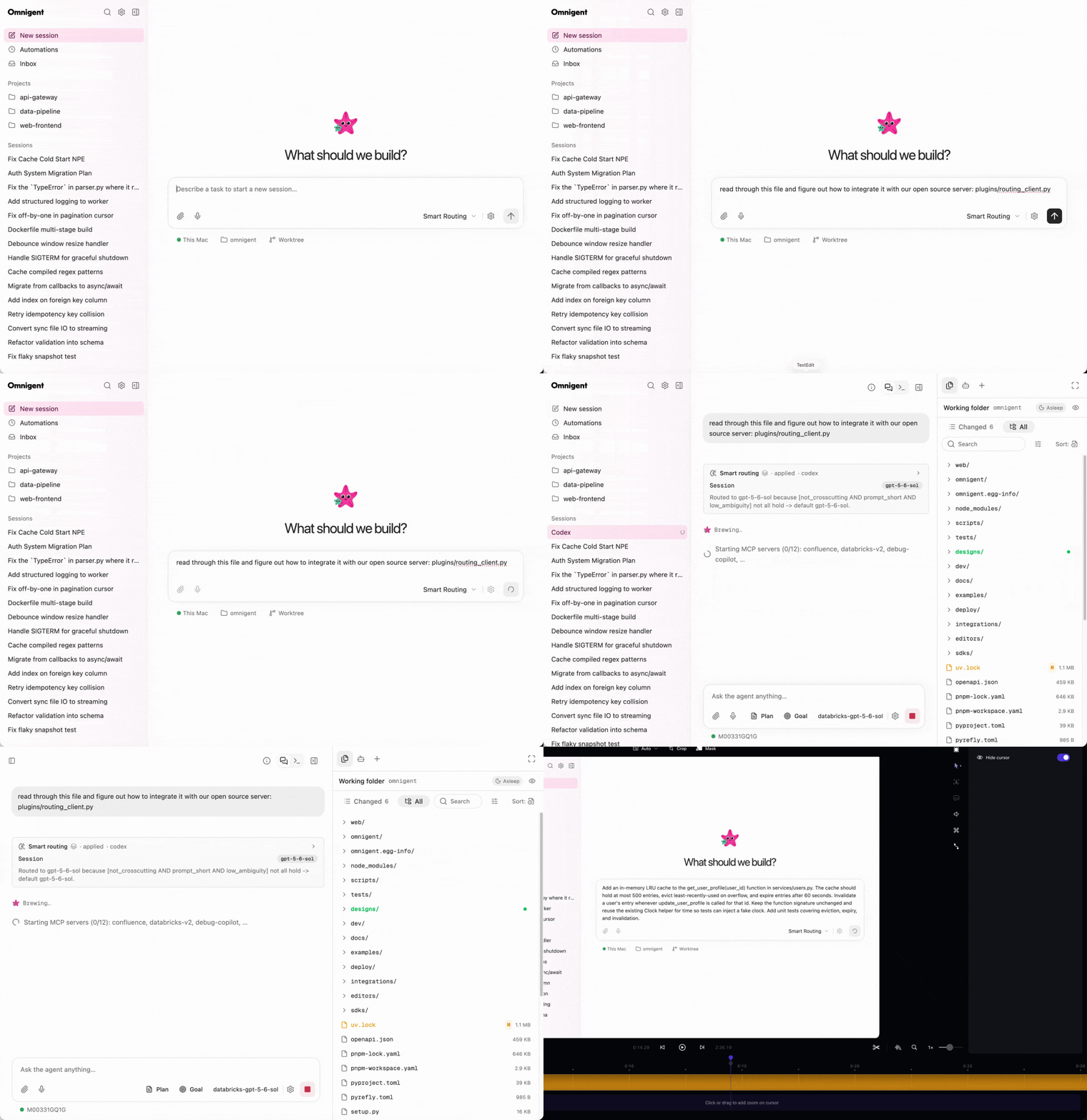
Choosing the right model for a task — and for every subagent that task spawns — is a decision you shouldn't have to make by hand on every run. Smart Routing makes it automatic: each task and its subagents are routed to the best model and harness for the job.
On Databricks, routing is powered by AI Gateway smart routing. In open source, smart routing uses an LLM classifier to pick the best model. Either way, you turn it on once and let Omnigent match work to the model that fits it.
Learn more in the Smart Routing docs.
2. Refreshed web UI
The web UI has been redesigned for clarity: a Zinc palette, tightened typography, flush rails, and unified menus and shadows give the whole interface a calmer, more consistent feel.
Alongside the visual refresh, session management gets more practical. A session filter menu lets you narrow to All, My, Shared, or Archived sessions, the harness picker is now organized by support tier, and settled turns fold away behind a compact "Worked for Xs" row so long conversations stay readable.
Learn more in the Web UI docs.
3. More sandbox and deployment control
This release gives you finer control over where and how agents run. Set sandbox.type: auto to pick the platform default automatically, and size Boxlite disks with sandbox.boxlite.disk_size_gb when a workload needs more room.
For team deployments, you can target per-agent Kubernetes runner Pods by label, set a project default base branch for new worktree sessions, and authenticate headless with omnigent run --profile against a deployed Databricks app.
4. New harnesses and example agents
Grok Build (xAI) joins as a first-class ACP harness, so you can drive Omnigent with xAI's coding agent the same way you would any other supported harness.
The release also ships a set of ready-to-run example agents: a deep-research agent, a repro-agent that reproduces a bug live and authors an end-to-end test for it, and a resolve-agent that fixes the bug and proves the fix. They're a practical starting point for building your own agents around real workflows.
Learn more in the Grok Build docs.
Full Changelog: https://github.com/omnigent-ai/omnigent/blob/main/CHANGELOG.md
What's Next
Install or upgrade Omnigent:
uv tool install --python 3.12 omnigent # or: pip install "omnigent"v0.8.0
Released 2026-08-03 · 3 min read · Omnigent maintainers
Omnigent 0.8.0 is a major release focused on making the platform smarter and more collaborative, from how you pick a model to how you bring in agents. Model choices now come live from your active providers and installed CLIs, the web workspace has been reworked into an editor-style experience, and new guardrail policies catch agents stuck in loops.
1. Live model discovery
Model lists used to be baked into each release, which meant they drifted out of date the moment a provider shipped something new. Now the choices come straight from your active provider catalog and the CLIs you actually have installed — Kiro, Cursor, and Pi — so the models you see are the models you can run.
To keep things stable when an upstream catalog hiccups, Omnigent validates and falls back to a last-known-good catalog, so a provider outage never leaves you without options. You simply pick from the current, live list when you start or switch a session.
2. Reworked web workspace and sidebar
The web workspace now behaves like a real editor. Files and shells open as tabs, with shells docked in the rail and a full-screen toggle when you want room to work. Markdown previews render Mermaid diagrams inline, and the subagent graph is clickable and zoomable so you can trace what your agents are doing.
3. More agents and sign-ins
Omnigent 0.8.0 widens the set of agents you can bring in and how you authenticate them. You can sign in to Antigravity with Google OAuth through agy, and add agy as a Polly sub-agent. Existing OpenClaw and acpx coding agents drop into the ACP picker with omnigent run --from-openclaw, and you can launch Claude and Codex children directly in goal mode.
4. New guardrail policies
Two new policies watch for agents that get stuck. detect_loop and detect_thrashing catch an agent retrying or failing in a loop and prompt you to step in before it burns time and tokens going nowhere.
The GitHub policy also gets safer by default: destructive deletes are now blocked unless you explicitly opt in with allow_destructive: true.
5. Sharper CLI
The command line gets a round of polish. omni upgrade now preserves your installed extras and accepts --extra, --target-version, and --dry-run so you can see exactly what an upgrade will do first. omnigent --help groups and colorizes harness commands for easier scanning, and omnigent diagnose prints a secret-free snapshot of your environment when you need to troubleshoot.
Nightly prerelease builds are now cut automatically, so you can ride the latest with omni upgrade --nightly.
Full Changelog: https://github.com/omnigent-ai/omnigent/blob/main/CHANGELOG.md
What's Next
Install or upgrade Omnigent:
uv tool install --python 3.12 omnigent # or: pip install "omnigent"July 2026
v0.7.0
Released 2026-07-27 · 3 min read · Omnigent maintainers
Omnigent 0.7.0 is a major release focused on putting your agents to work on your own terms, from scheduling recurring tasks that run without you to letting Omnigent pick the right harness and model for the job. This release brings first-class Automations and a dedicated /tasks page, real Project entities that organize your sessions and pre-fill their defaults, hands-free voice dictation in the composer, and smarter routing that chooses both harness and model straight from your task.
1. Automations (Scheduled Tasks)
Some work should just happen on a cadence — a morning digest, a nightly cleanup, a weekly report — without you kicking it off by hand every time. Automations let you set an agent task to run on a recurring schedule and then get out of the way.
A new /tasks page lets you create, edit, and run recurring agent tasks, complete with model and reasoning-effort selectors and a "Run now" action for when you don't want to wait for the next firing. You get live relative next-run times so you always know what's coming up, plus terminal run tracking with full history available at GET /v1/scheduled-tasks/{id}/runs. For chat-only work, tasks no longer require a workspace or a pinned host, so you can automate a conversation as easily as a code job.
Learn more in the Scheduled Tasks.
2. First-class Projects
Projects keep related work grouped instead of scattered across a flat session list. You can create, rename, and delete them right in the sidebar and file your sessions into the project they belong to.
Each project can carry its own default session settings — host, working directory, agent, and model — which pre-fill the new-session composer so you're not re-selecting the same options every time you start work in a familiar context.
Learn more in the Projects.
3. Voice dictation in the composer
Sometimes it's faster to talk than to type. Optional server-side transcription — installed with omnigent[dictation] — lets you dictate straight into the composer, with live streaming partials so you can watch your words appear as you speak.
It works in Electron, Firefox, and Chromium, and your audio never leaves your server. Toggle it from anywhere with ⌘⌥V, and if you'd rather not run transcription in-process, the engine can be offloaded to a remote worker.
4. Smarter routing
Choosing the right harness and model for each task is friction you shouldn't have to think about. A new "Auto · smart routing" harness option lets the router pick both the harness and the model based on your task itself.
Smart routing now activates automatically from your llm:/routing: config — there's no OMNIGENT_SMART_ROUTING env var to set anymore. And when you want to steer things yourself, a composer gear modal lets you tune the model, reasoning effort, and routing mid-chat without leaving the conversation.
Learn more in the Harnesses.
Full Changelog: https://github.com/omnigent-ai/omnigent/blob/main/CHANGELOG.md
What's Next
Install or upgrade Omnigent:
uv tool install --python 3.12 omnigent # or: pip install "omnigent"v0.6.0
Released 2026-07-21 · 3 min read · Omnigent maintainers
Omnigent 0.6.0 is a major release focused on meeting you wherever you work, from bringing your existing chats in and reading files richly to driving sessions from Slack and a desktop app on every platform. It lands a guided theme editor for making the UI your own, first-class Slack control complete with inline approvals, and native desktop apps that now run on Windows and Linux alongside macOS.
1. Richer file viewing
Reading files inside Omnigent now covers far more than plain source. You get inline PDF preview with review comments, find-in-file across the editor, and rendered previews for markdown and notebooks — so you can review what the agent produced without leaving the session.
The diff viewer adds a "Wrap lines" toggle for long lines, and the file panel stays browsable even when the runner is offline, as long as the host is still connected, so you are never locked out of your files mid-session.
Learn more in the Code viewer and diffs.
2. Custom themes
You can now shape Omnigent's look with a guided theme editor. Shared accent, tint, and contrast controls plus a sidebar translucency setting let you tune the whole interface, and there is a new Nord palette to start from — or hit the randomize dice to discover a look you like.
The file editor follows your Omnigent theme too, so your chosen palette carries through from the session view into the code you are reading and editing.
Learn more in the Appearance settings.
3. Bring your existing work in
Starting fresh in a new tool usually means leaving your history behind. Now you can import your Claude Code and Codex chats directly with omni import, bringing up to 50 conversations in at once. Imported and new sessions also get automatic first-turn titles, so your list stays readable without any manual naming.
Learn more in the Import existing chats.
4. Navigation bar in transcript
Long transcripts are now easy to move through. A navigation bar in the session transcript lets you jump around your history with a click, so you can find an earlier turn or result without endless scrolling.
5. Slack integration
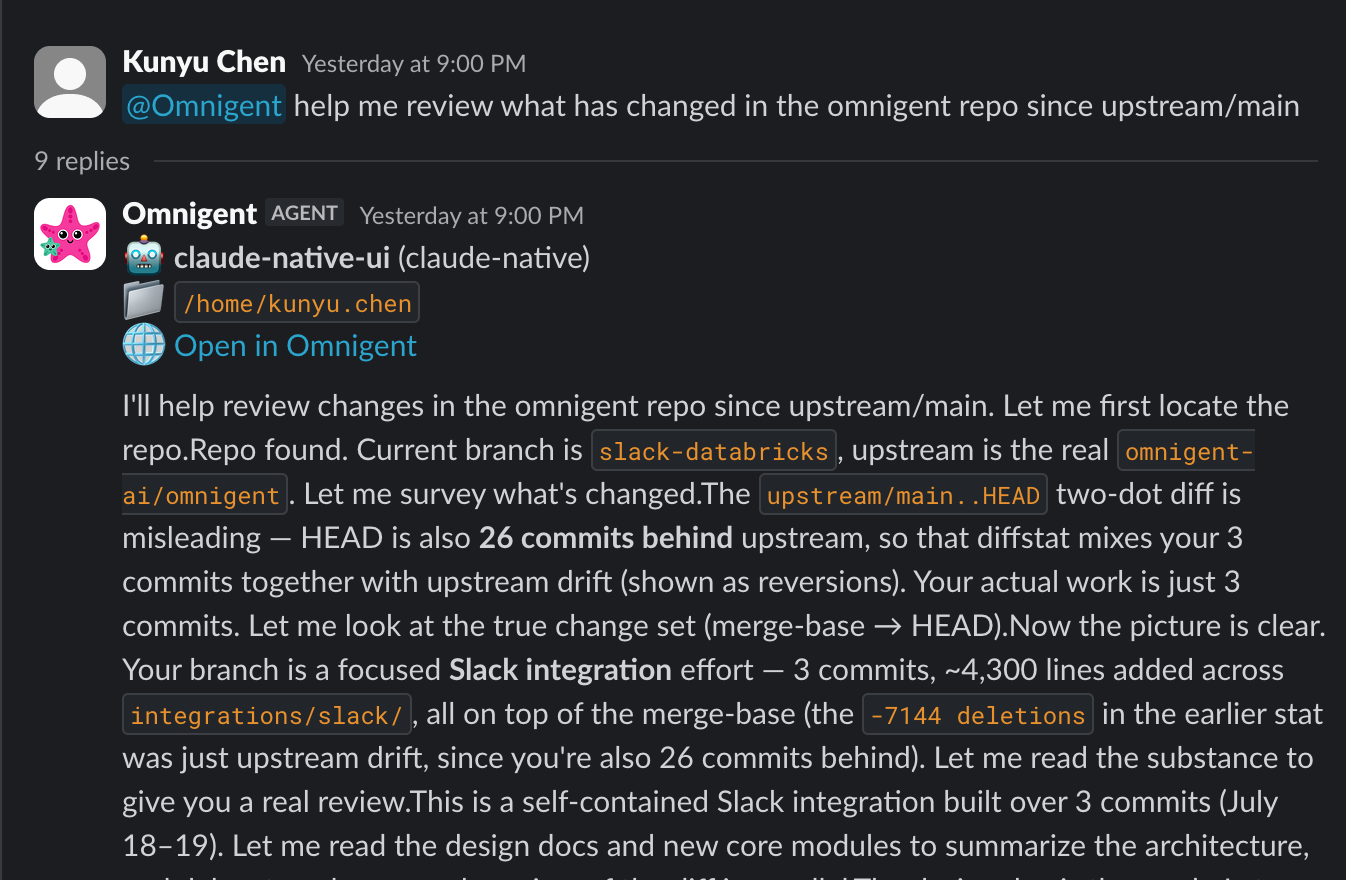
You can now kick off and drive Omnigent sessions straight from Slack. Beyond starting work, you can approve tool calls and answer the agent's questions inline in the channel, so you can keep a session moving from wherever your team already talks.
Learn more in the Slack.
6. Omnigent desktop app on Windows and Linux
The Omnigent desktop app is no longer macOS-only. Windows and Linux builds are now available, so you can run the native app on your platform of choice. Download the build for your system from the website.
Learn more in the Install.
Full Changelog: https://github.com/omnigent-ai/omnigent/blob/main/CHANGELOG.md
What's Next
Install or upgrade Omnigent:
uv tool install --python 3.12 omnigent # or: pip install "omnigent"v0.5.1
Released 2026-07-10
Bug fixes
- 🖥️ On older desktop builds without the embedded browser, the Browser tab is now hidden instead of showing a dead tab that does nothing (#2393)
💜 Thanks to our community
This release was shaped by the people who filed issues, opened PRs, and talked through feature requests with us on our Discord! Thank you for building omnigent with us, keep the bug reports, ideas and contributions coming :)
Full Changelog: https://github.com/omnigent-ai/omnigent/blob/main/CHANGELOG.md
v0.5.0
Released 2026-07-10
Major new features
- 📱 Omnigent for iOS — now on the App Store — the native iOS app is live on the App Store; Android is coming soon (#2262, #2263, #2282, #2179)
- 🧩 Generic ACP harness — connect Omnigent to any ACP-compatible agent, bridged to Omnigent's own tools over an MCP relay (#2152)
- 🔎 Command palette & richer search — a global ⌘/Ctrl+K palette (also wired to the sidebar "Search") jumps across sessions, and session search now shows a highlighted matched-content preview so you can see why a session matched (#1386, #2086, #2162)
- 🎨 Appearance & customization settings — pick a color theme (Omnigent, Dracula, GitHub, Catppuccin, Gruvbox), a terminal theme, and independent UI and code editor/terminal font size + family (#2225, #2147, #2154, #2135, #2040, #2047)
- 💬 Message steering & queuing — line up several messages while a turn runs, then edit, reorder, delete, or steer them; queued messages auto-flush on idle, in the background, and across sessions (with attachments) (#2008, #2010, #2019, #2022, #2025, #2029, #2078)
- ☸️ Kubernetes deployment — a new official
omnigent-server-kubernetesimage ships the sandbox provider SDK (no custom build), and runner Pods can now schedule on arm64 vianode_selector(#2124, #2123) - 🌿 Start sessions in git worktrees — pick an existing worktree or generate a fresh branch name right from the new-session composer, see the branch in the sidebar, and delete the worktree + branch on session delete; set a default base branch in Settings › Git (#2088, #2094, #2098, #2267)
- 🌐 Embedded browser — the Omnigent desktop app now ships a built-in browser pane your agent can drive with framework-owned tools (
browser_navigate,browser_click,browser_type,browser_snapshot,browser_screenshot) — it opens a page, reads it, and acts on it without leaving the workspace (#2248) - 🖥️ Better web terminal — tmux control-mode (CC) is now the default transport, so the browser owns scrollback and text selection natively in the terminal view (no more fighting tmux for the viewport or mouse), with output coalesced into fewer WebSocket frames for a snappier feel (#1970, #1972)
Bug fixes
- 🖥️ claude-native reliability — resumed sessions no longer crash on compaction or
TaskOutputhistory, in-pane/modelswitches no longer stick on "Stop", and mid-turn messages no longer raise a false "terminal did not become ready" error (#1957, #2293, #2082, #2001, #2089) - 🧭 Smart routing & compaction — intelligent routing now correctly routes Claude sessions and overrides an orchestrator-specified model when the parent toggle is on, and
/compacton a pinned Anthropic model no longer 500s (#2136, #2291, #2043) - 🚀 Launch & gateway auth — harness workers now start when Omnigent is launched from a macOS/Linux GUI client (stripped PATH), and managed claude-native sessions against an Anthropic-compatible gateway pass through the model instead of stalling on the API-key menu (#1935, #2371)
- ✅ Approvals & policies — inbox approvals now resume the gated tool call, and default policies created via the API now take effect on sessions (#2142, #2333)
- ⏱️ Idle-session stability — messaging a long-idle session no longer risks the new turn being killed mid-flight by the idle reaper (#1834)
💜 Thanks to our community
This release was shaped by the people who filed issues, opened PRs, and talked through feature requests with us on our Discord! Thank you for building omnigent with us, keep the bug reports, ideas and contributions coming :)
Full Changelog: https://github.com/omnigent-ai/omnigent/blob/main/CHANGELOG.md
v0.4.0
Released 2026-07-03
Install
uv tool install --force "omnigent==0.4.0"0.4.0 turns harnesses into a real plugin platform — bring your own coding agent as an installable package — and matures the whole native-harness fleet with parity, cost, and polish across the board.
Major new features
- 🤹 Polly multi-agent orchestration: the polly example orchestrator now fans work out across more coding sub-agents — cursor, hermes, and opencode join the roster — so a single run can delegate to the right agent for each task (#1844, #1776)
- 🔌 Harness plugin SDK: bring your own coding agent — any harness can now ship as an installable Python package (via the
omnigent.community.harnessentry point), no fork or core changes required. A declarative capability model + a/v1/harnessescatalog let the server and UI discover what each harness supports (#1756, #1847, #1894) - 🪢 Native-harness maturity across the fleet:
- kiro-native reaches full parity: Omnigent tools inside kiro sessions, a launch-time model picker, TUI approvals surfaced as chat cards, working interrupt / Stop, and credit usage tracked as session cost (#1709, #1706, #1715, #1293, #1531, #1699)
- claude-native renders live tool-call cards in the web chat, shows background-shell status, and takes a pluggable launch command (#1499, #1578, #1476)
- qwen-native gains Omnigent tools in the TUI and carries conversation history across fork / switch-agent (#1559, #1576)
- GitHub Copilot reports authoritative AI-credit cost, forwards reasoning effort, emits compaction-complete events, and gates its native tools through policy (#1486, #1503, #1505, #1511)
- 🧩 VS Code extension (coming very soon): open and drive your running Omnigent server without leaving the editor — landing shortly, not on the Marketplace just yet (#1288, #1855)
- 🛡️ Better control & elicitation: clicking Decline now cleanly cancels the turn instead of nudging the model to retry, a new
intent_gatekeeps an agent on its original task, and sub-agents can carry their own cost budgets (#1839, #1777, #1538) - 💻 Web & CLI polish: unread/seen state syncs across devices, compaction shows a progress bar instead of a silent pause, a new
!shell passthrough folds command output into your next turn, half-typed drafts survive navigation, the file viewer gains image zoom + inline comments, and the app installs as an offline-capable PWA (#1679, #1304, #1524, #1659, #1775, #116) - 🔎 Zero-setup web search:
web_searchworks out of the box with a keyless DuckDuckGo backend; add Tavily for grounded search on any model (#918, #1339)
Bug fixes
- Connections hold under load — a ws-tunnel keepalive fix ends mid-session disconnects (#1727).
- Sub-agent results reliably reach the parent session now, instead of getting lost (#1770).
- pi-native recovers on long sessions — tool calls no longer start failing about an hour in (#1621).
- Native harnesses survive sandbox restarts — codex/claude-native restore compaction + transcript on resume (#1535).
- No more zombie processes or runaway terminal panes — orphaned tool/harness processes are reaped and idle panes self-heal (#1812, #1624).
- Accurate costs — fixed a lost-update race in session usage and stopped double-billing Cursor cache tokens (#1664, #1802).
...and more!
💜 Thanks to our community
This release was shaped by the people who filed issues, opened PRs, and talked through feature requests with us on our Discord! Thank you for building Omnigent with us, keep the bug reports, ideas and contributions coming :)
Full Changelog: https://github.com/omnigent-ai/omnigent/compare/v0.3.0...v0.4.0
June 2026
v0.3.0
Released 2026-06-27
Major new features
- 🤖 Seven new agent harnesses: Hermes (SDK + native TUI), GitHub Copilot (SDK), OpenCode, Goose, Qwen Code, Kiro, and Kimi Code; plus Antigravity promoted to a full SDK + native agy CLI harness (#1132, #330, #576, #955, #1020, #899, #521, #892)
- 🪢 Native-harness parity across the fleet: compaction, cost/token tracking, resume, true fork with history, in-session model switching, and tool-approval / AskQuestion web cards, for cursor, codex, qwen, pi, hermes, goose, and opencode (#1303, #1331, #1271, #1260)
- 🖥️ Omnigent Desktop: now manages the server + runner automatically (#1437, #1445)
- 🗂️ Projects workspace: group sessions into Projects and drag between them, plus a Settings surface and per-harness run-mode memory (#1341, #1432, #1110)
- 📦 More deploy & sandbox targets: host on Databricks Apps + Lakebase Postgres (#956), AWS Bedrock provider (#901), on-demand Kubernetes runner Pod sandbox (#881), and a boxlite managed host (#102)
- 🪟 Native Windows support (only core features) (#1236)
- 🕵️ Custom Agent Creation UI (#1098)
- 🔌 In-app MCP management from Agent Info (#1093), sys_session_share agent-facing session sharing (#985), and web UX polish — shortcuts overlay, pinned-session hotkeys, image lightbox (#833, #967, #1334)
Bug fixes & hardening
- Authoritative context-window resolution + compaction-failure surfacing + /context meter; compaction ownership moved runner→harness, ending compact-every-message (#1121, #1169, #1082).
- Native harnesses no longer fail silently — codex/antigravity surface real turn/model/auth errors instead of empty/false success (#1108, #1172).
- Policy checks fail closed when turn context is missing (#1078).
- Parallel sub-agents — serialized continuation turn-starts fix the 204 race (#996).
- claude-native stability — tmux server survives inner-CLI exit (#849). ...and more!
Full Changelog: https://github.com/omnigent-ai/omnigent/compare/v0.2.0...v0.3.0rc1
💜 Thanks to our community
This release was shaped by the people who filed issues, opened PRs, and talked through feature requests with us on our Discord! Thank you for building Omnigent with us, keep the bug reports, ideas and contributions coming :)
v0.2.0
Released 2026-06-19
Install
uv tool install --force "omnigent==0.2.0"0.2.0 turns omnigent into a multi-vendor agent platform with pluggable agent SDKs, a much wider fleet of sandbox & deploy targets, and hardened security underneath.
Major new features
- 🤖 More agent harnesses & SDKs
- 📦 More sandboxes & deploy targets
- ⬆️
omni upgrade: self-upgrade the CLI to the latest release, with an out-of-date notice on startup (#188). - 🔒 Secretless sandbox egress:
credential_proxyinjects bearer/basic auth for allow-listed hosts so secrets never enter the sandbox (#236) - 📊 MLflow tracing end-to-end through
omnigent run(#638)
Bug fixes
omni upgradeis version-aware — upgrades to the right release instead of looping against a stale version (#726).omnigent runexits cleanly on an INPUT-phase policy denial instead of hanging (#599).- The REPL no longer crashes when the daemon returns a non-JSON status response (#660).
Full changelog: https://github.com/omnigent-ai/omnigent/compare/v0.1.1...v0.2.0
💜 Thanks to our community
This release was shaped by the people who filed issues, opened PRs, and talked through feature requests with us on our discord! Thank you for building Omnigent with us, keep the bug reports, ideas and contributions coming :)